Sunday, 1 July 2018

LPDDR5, UFS 3.0 and SD Express: Next-gen memory explained https://ift.tt/2KFh268

SD to microSD card

Memory technology may not be as instantly noticeable as a crisp new display or a faster processor, but it’s key for ensuring a smooth, stutter-free smartphone experience. The industry is pushing towards higher quality images and video, high-fidelity gaming, and machine learning. Memory bandwidth and capacity are under more strain than ever before.

Fortunately, new memory technologies are on the way to alleviate the strain. These include LPDDR5 RAM, UFS 3.0 internal storage, and SD Express portable memory cards. The general gist is that each of these standards will be faster than their predecessors, but let’s take a closer at the finer details and how each will help shape superior mobile experiences.

LPDDR5 RAM

RAM is an essential part of every computer, but smartphones are particularly sensitive to memory bandwidth because the CPU, GPU, and increasingly AI engines are all located on the same chip and share this memory pool. This is often a bottleneck in gaming, 4K video rendering, and other instances that require lots of reading and writing to memory.

We’re still waiting on the final specifications, but LPDDR5, just like its predecessors, is set to increase the amount of available bandwidth and improve energy efficiency once more. LPDDR5 bandwidth is expected to hit at least 6400 Mbps, doubling the 3200 Mbps that LPDDR4 shipped with. Although, subsequent revisions have seen LPDDR4 and 4X able to hit up to 4266 Mbps.

LPDDR5 evolution Synopsys

According to IC design company Synopsys, LPDDR5 introduces a dual differential clock system using a WCK clock similar to that found in fast GDDR5 graphics memory. Differential clocking increases the frequency without upping the pin count and these two clock implementations (WCK_t and WCK_c) allow for two different operating points at either double or quadruple the command/address clock. LPDDR5 will also support Link ECC functionality for Read and Write operations, allowing it to recover data from transmission errors or due to storage charge loss.

Better still, the standard is still focusing on energy efficiency — a key requirement for mobile products — with a lower operating voltage. Deep Sleep Mode is also implemented to reduce current by up to 40 percent when either in an idle or self-refresh state. Data Copy Low Power also reduces power by utilizing repeating data patterns for normal Write, Mask Write, and Read operations, so the higher performance point shouldn’t drain any more of our precious battery life.

We’re still waiting on manufacturers to announce their first LPDDR5 memory chips. Samsung murmured some plans to accelerate commercialization late last year and rumor suggests that production could start in the second half of 2018. Either way, we aren’t expecting to see our first phones boasting the technology until 2019 at the very earliest.

UFS 3.0 ROM

Fast storage is just as important as fast RAM these days, especially if you want to read and store high-resolution video or load up high-quality assets for AR and VR. UFS is quickly replacing eMMC as the memory standard of choice in smartphones. JDEC has already published the official UFS 3.0 specification for its next-gen memory, giving us a look at the performance and power improvements heading to future high-end mobile device storage.

The headline improvement is that speeds have doubled from UFS 2.0 found in some of today’s high-end devices. Each lane can handle up to 11.6 Gbps of data, up from 5.8 Gbps, which gives a peak transfer speed of a whopping 23.2 Gbps. That said, real speeds will be a bit lower than this theoretical maximum. Fortunately, all UFS 3.0-compatible devices are required to support HS-G4 (11.6 Gbps) and HS-G3 (5.8 Gbps), so they’ll definitely be faster than all versions of UFS 2.0.
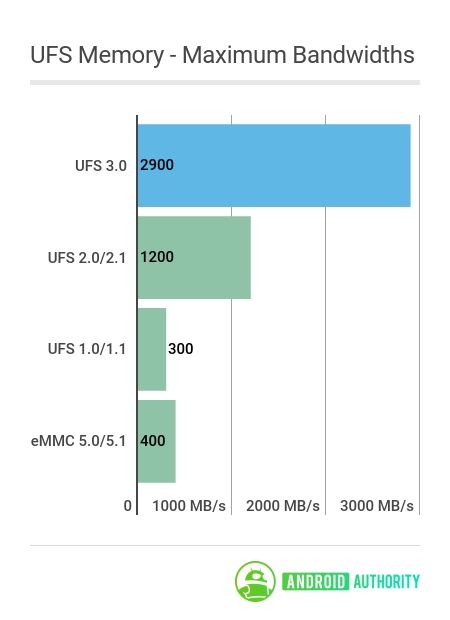
The standard’s power consumption has changed too. There are now three power rails, 1.2V, 1.8V, and 2.5V/3.3V, and the introduction of 2.5V on the VCC line will help support upcoming higher density 3D NAND flash designs and lower power consumption. In other words, UFS 3.0 is designed to support larger storage sizes, which will be available with upcoming manufacturing techniques.

Just like LPDDR5, Samsung looks set to be one of the first to offer UFS 3.0 storage. Manufacturing for automotive applications has already begun, so a product suitable for smartphone use probably isn’t too far away either. The technology will likely hit the mainstream in 2019.

SD Express portable storage

Finally, we come to portable storage, a sought-after feature in smartphones for moving large media libraries between devices. The newly unveiled SD Express standard will likely replace future microSD cards, although fast UFS memory cards remain a possibility too. In a nutshell, SD Express boasts the fastest ever SD card speeds and support to use them as portable SSDs.

SD Express incorporates PCI Express and NVMe interfaces into the legacy SD interface, two common data bus standards found across the PC space. These interfaces will be supported on the second row of pins that are already used by highspeed UHS-II microSD cards on the market today.

Supporting PCI-E 3.0 with SD Express means peak throughput can hit a whopping 985MB/s, which is more than three times faster than UHS-II cards which top out at 312MB/s and even faster than UHS-III cards that support up to 624MB/s. Meanwhile, NVMe v1.3 is the industry standard used for solid state drives (SSDs), which means that upcoming SD cards will be able to serve as removable SSDs for plug and play access to large amounts of data, software, and even operating systems.
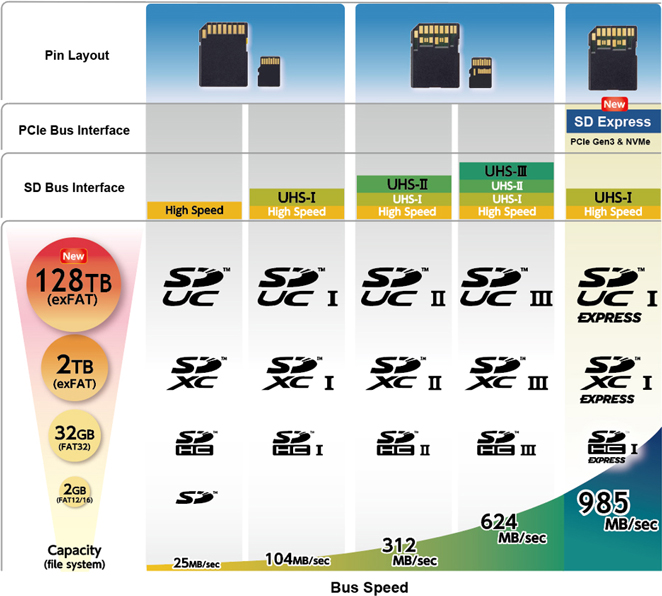
SDcard bus speed and storage SDcard

In addition to supporting higher speed memory interfaces, the maximum storage capacity of future microSD cards is set to increase from 2TB with SDXC to 128TB with the new SD Ultra-Capacity (SDUC) cards.

SD Express is backward compatible with existing microSD cards and ports, but you’ll be limited to the lower speeds. So a UHS-I device will be capped at 104MB/s, even with an SD Express card. Unfortunately, there are a few compatibility issues with newer card types too that will cap speeds, as a UHS-II or UHS-III card will revert to UHS-I speeds in an SD Express host because the pins are repurposed.

Wrap up

Memory improvements are heading our way across the board, catering for faster and higher capacity internal memory, RAM, and portable storage. At first, these latest technologies will command a premium, as usual, so we’ll certainly see them appear in flagship-tier smartphones first, before trickling down to more cost-effective price points the following year or so.

Each of these faster memory technologies will likely break through into flagship smartphones in 2019, although it’s possible we might see a phone or two adopt one of these features a little sooner than the pack. We’ll just have to sit tight until memory manufacturers announce the actual chips that will end up in products.


from Android Authority https://ift.tt/2MCm7Ju

Summer special: 2TB Degoo cloud storage for life https://ift.tt/2tThoeJ

cloud storageToday’s deal from Degoo is simple but effective. All the highly-secure cloud storage space you’ll ever need. Forever.

I’m not a particularly organised person. I have files on my laptop hard-drive, a Dropbox account holding various other nonsense, and a load of photos and vids on my Google Drive from various holidays. It’s not a huge amount, but I’m running out of space. The security level of my laptop, both from hackers and from the risk of a rogue splash of coffee, is questionable. Sound familiar?

Degoo cloud storage is the logical solution for me. With an enormous 2TB space I could, and should, move all of the above into this one place, safe from beverage attacks. Thanks to the Ultra secure 256-bit AES encryption on the cloud storage, it would also be safe from hackers and viruses too.

degoo cloud storage

The deal we’re spotlighting today is for the Degoo Premium service, which offers high speed transfers, and automatic backup of files when they’re added or edited. It’s the full package.

Right now you can get this 2TB lifetime storage for just $59.99. That’s a one-off payment and a chunky 95% discount. To put that in even more context, 2TB storage on iCloud is around $10 per month, so after six months with Degoo you’re already winning.

15 million people already trust their files to Degoo. Secure your stuff by hitting the button below before the offer ends.

The AAPicks team writes about things we think you’ll like, and we may see a share of revenue from any purchases made through affiliate links. To see all our hottest deals, head over to the AAPICKS HUB.


Looking for a new phone or plan? Start here with the Android Authority Plan Tool:

This smart tool lets you filter plans by phone, price, data tiers, and regional availability. Stop overpaying for cell service you hate and a phone that you’re tired of. Use our Compare Phones & Plans tool to fully customize your mobile experience and painlessly transition from one carrier to another!


from Android Authority https://ift.tt/2tUSETh

Here are the 10 most sold phones of all time — you’re in for a surprise https://ift.tt/2tKgbal

The 10 most sold phones of all time are likely not the ones you think. Samsung’s Galaxy S and Note series didn’t make the cut, and nor did any other Android handset. The list is dominated by Nokia feature phones, also including older devices from Samsung, Motorola, and Apple. You can check out the full list below, which was created with the help of data compiled by The Telegraph and various other sources.

10. Motorola Razr V3 — 130+ million units sold

most sold phonesThe Motorola Razr V3 was an icon of its time. The device’s gorgeous design stood out from the crowd and made it one of the most successful phones ever. Not only is it the 10th most sold phone of all time, it’s also the highest selling flip phone ever. The Razr V3 can’t compare with today’s handsets in specs, but it was among the best around back in the day.


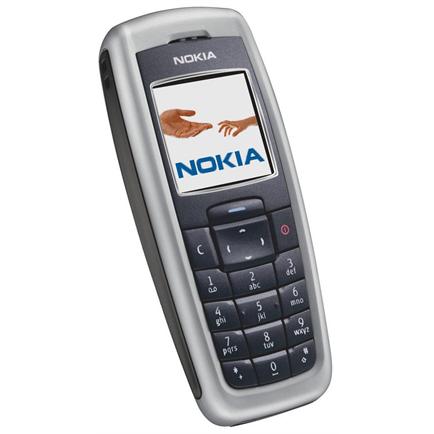
9. Nokia 2600 — 135+ million units sold

most sold phones

Released in 2004, the Nokia 2600 didn’t offer much — at least not by today’s standards. It was a simple device with the sturdy body Nokia devices were known for and small 1.5-inch display. It didn’t feature a camera, Bluetooth connectivity, or any other fancy features. But it did have great battery life and an affordable price tag that made it popular among many.


8. Samsung E1100 — 150+ million units sold

most sold phones

Like the Nokia 2600, the Samsung E1100 had a sturdy body and offered great battery life — 13 days on standby. It debuted in 2009 and became a success due to its affordable price and worldwide availability. The device featured a 1.52-inch display, 1MB of internal storage (that’s not a typo), and a built-in flashlight for finding stuff in the dark.


7. Nokia 5230 — 150+ million units sold

most sold phones

The Nokia 5230 was an entry-level smartphone with a 3.2-inch touchscreen, the Symbian operating system, and 3G connectivity. It also had a GPS chip, a 2MP camera, and 128MB of RAM. The device couldn’t connect to a Wi-Fi network, but that didn’t seem to bother people in 2009.

Read next: Nokia showdown: Nokia 7 Plus vs Nokia 8 Sirocco


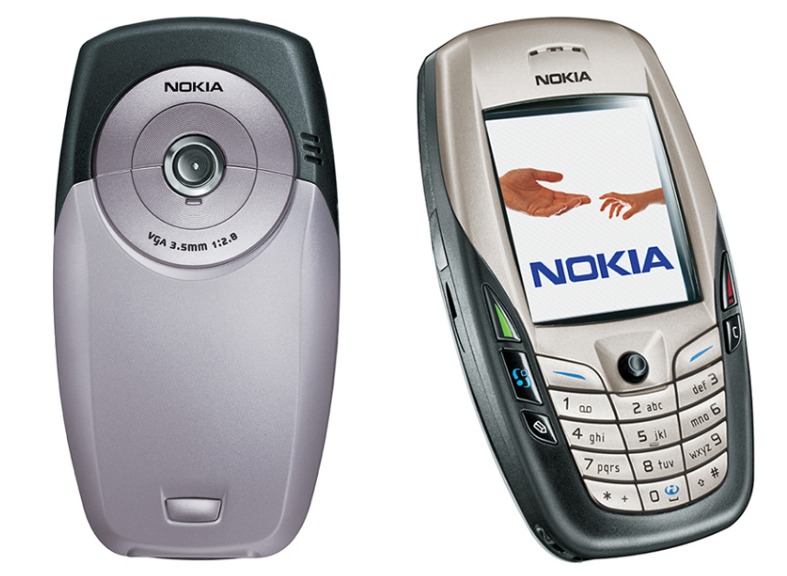
6. Nokia 6600 — 150+ million units sold

most sold phonesThis phone’s quirky design made it special. Just look at it. It’s one of those things you either love or hate. Most people seemed to love it, considering it sold over 150 million units across the globe. The Nokia 6600 was a high-end model when it came out in 2003, offering a 2.1-inch display, a basic camera, and an 850mAh battery. It was quite expensive, retailing for around 600 euros (~$695).


5. Nokia 1200 — 150+ million units sold

most sold phones

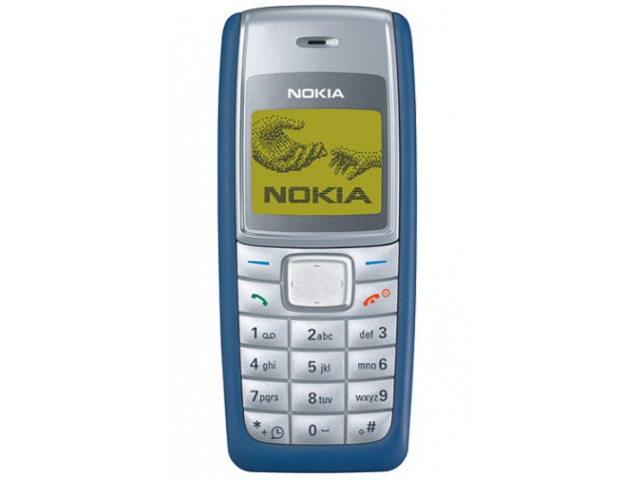
The biggest feature of the Nokia 1200 was its battery life — seven hour of talk time and 390 hours on standby. It also had a flashlight you could turn on by long-pressing the scroll up key. Other than that, the phone wasn’t really all that exciting — it was just well built and well priced. That, plus the fact you could get it just about anywhere, made the Nokia 1200 one of the most popular phones in the world with over 150 million units sold.


4. Nokia 3210 — 150+ million units sold

Motoring Research

The Nokia 3210 is super old. It launched in 1999, when phones were only used for making calls and sending texts. The handset became a massive success due to its robust body, many color options, attractive look, and the Nokia logo up front, among other reasons. Its best feature was the Snake game, which kept people glued to their screens for hours on end.

Read next: Best Android Wear watches


3. iPhone 6 and 6 Plus — 220+ million units sold

most sold phones

Released in 2014, the iPhone 6 and 6 Plus are the newest phones on this list. They can’t compare with the latest iOS or Android devices in terms of specs, but they offer way more than the other 9 most sold handsets of all time. One of the reasons for their success was their upgraded 4.7- and 5.5-inch displays, up from the iPhone 5s’ 4-inch screen. The iPhone 6 was three-times more popular than its bigger brother in the first few months of availability, likely due to its lower price tag.


2. Nokia 1110 — 250+ million units sold

most sold phones

This compact phone only offered the basics. It didn’t have a camera, a color display, or a fancy design like the Nokia N70 and many other devices also released in 2005. Still, it outsold just about everyone, mainly due to its global availability and affordable price. It was a great handset for those who only wanted to make calls, send texts, and play Snake every now and then.


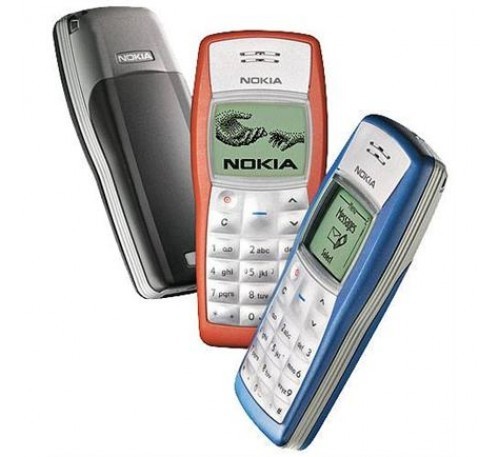
1. Nokia 1100 — 250+ million units sold

most sold phones

The most sold model of all time is the Nokia 1100, a basic phone that debuted in 2003. It had a simple, curvy design that appealed to many, a small monochrome display, and a flashlight on top. It stuck to the same formula that made all the other Nokia feature phones popular, offering a solid build quality, an attractive design, and an affordable price tag. Nokia’s vast distribution network also brought the device to loads of markets across the globe, which played a big part in its success.

Read next: Here are 5 best phones for all you notch haters out there


There you have it, folks. These are the 10 most sold phones to date. Any thoughts or comments? Leave them down below — I always love hearing from you guys.

Also, let me know if you’d like to see a list revealing the top 10 most sold Android phones of all time. I’ll make it happen if there’s enough interest.


from Android Authority https://ift.tt/2z5IC82

Must read: top 10 Android stories https://ift.tt/2yZnMqH

This week we reviewed the Vivo Nex and BlackBerry Key2, found out when the Galaxy Note 9 is launching, and got our first (unofficial) look at the Google Pixel 3! Here’s what you need to know about this past week in Android.

Who wants to win an LG G7 ThinQ?

This week, one lucky reader will win a brand new LG G7 ThinQ. Enter this week’s Sunday giveaway for your chance to win!

10 Android stories we handpicked for you

Vivo Nex review: Frustratingly imperfect, undeniably desirable Our Vivo Nex review reveals why this lust-worthy device should remain an object of desire rather than become the phone in your pocket.


BlackBerry Key2 review: Convenience is key BlackBerry set out to create a phone for people who value productivity over multimedia, and uniqueness over monotony. This is the BlackBerry Key 2 review.


Samsung Galaxy Note 9 will launch August 9 The Samsung Unpacked event where the Samsung Galaxy Note 9 launch will occur is happening on August 9, 2018.


Google Pixel 3 and Pixel 3 XL 360-degree render videos appear online OnLeaks and mysmartprice have published CAD render images and videos of the rumored Pixel 3 and Pixel 3 XL — come take a look!


10 best new Android games from June 2018 Android gaming is getting bigger and there are always awesome, new games coming out! Check out our list of the best new Android games from the last month.


The race to 100%: How screen-to-body ratios changed over the years The 2007 BlackBerry Curve had a screen-to-body ratio of 30.1 percent. Oh how things have changed.


Samsung Galaxy S10: All the rumors in one place Here are all of the rumors and stories surrounding the Samsung Galaxy S10, the next version of the company’s flagship phone series.


Google’s endless app overlap: What’s going on? Google may be great at organizing the world’s information, but it still kinda sucks at organizing its own apps.


Worst phone ever? Team AA reveals their handset horror stories We’ve gone through plenty of devices, but which ones made for the worst smartphone experiences?


BBK’s crazy month shows phones can still be fun and innovative Between the OnePlus 6, Vivo Nex, and Oppo Find X, BBK’s brands are showing the industry how to innovate.


Don’t miss these videos

Watch more Android videos on our YouTube channel.

More hot news

From our network

Join our newsletters!

Join over 200,000 subscribers for the latest tech reviews, hot deals, and exciting giveaways.
We guarantee 100% privacy. Your information will never be shared. Sign up now and get FREE access to our upcoming exclusive AA Insiders Club:


from Android Authority https://ift.tt/2KmWpfF

LG G7 ThinQ international giveaway! https://ift.tt/2gT9gZw

Welcome to the Sunday Giveaway, the place where we giveaway a new Android phone each and every Sunday.

A big congratulations to last week’s winner of the Google Pixel 2 XL and Pixel Buds giveaway: Ron M from Florida, USA.

This week we are giving away a brand new LG G7 ThinQ, courtesy of the Android Authority App!

If you’re looking for the best way to stay up to date with AndroidAuthority.com, look no further than the AA App for Android. Available for free in the Google Play Store, the official AA App is the fastest way to get all the latest news, rumors, tips and tricks, and device reviews on your mobile device.

It’s fast, looks good, and gives you breaking Android news at your fingertips — what more could you want?

The new LG G7 ThinQ is an amalgamation of last year’s V30 and G6… with a little iPhone X thrown in.

On top of that super bright 6.1-inch display, you’ll find the oh-so-2018 notch cutout. If you aren’t a fan, you can “turn off” the notch in the settings menu.

LG phones have always provided a solid audio experience, and the G7 ThinQ is no different. The phone actually uses its inner space as a resonance chamber to boost bass and deliver all-around louder audio. It also comes with a 32-bit Hi-Fi Quad DAC and DTS:X 3D Surround Sound support.

This phone also comes with some of the best specs you can find on any smartphone out there: a Snapdragon 845 SoC, dual 16MP wide-angle cameras, as well as IP68 and MIL-STD 810G certifications. As an added bonus, there’s also a dedicated Google Assistant button that lets you talk to the voice assistant like a walkie-talkie. It’s pretty neat.

To learn more about the LG G7 ThinQ, check out our related coverage below:

Enter the giveaway here

LG G7 ThinQ international giveaway!

Don’t miss: Best Android phone (June 2018) giveaway | Jaybird Run international giveaway

Winners gallery

Terms & Conditions
  • This is an international giveaway (except when we can not ship to your country.)
  • If we can not ship to your country, you will be compensated with an online gift card of equal MSRP value to the prize.
  • We are not responsible for lost shipments.
  • We are not responsible if your giveaway prize malfunctions.
  • You must be age of majority in your country of residence.
  • We are not responsible for any duties or import fees that you may incur.
  • Only one entry per person; please do not enter multiple email addresses. We will verify all winners and if we detect multiple email addresses by the same person you will not be eligible to win.
  • We reserve all rights to make any changes to this giveaway.
  • This giveaway is operated by Android Authority.
  • The prize will ship when it is available to purchase.

More: Android Authority international giveaway FAQs


from Android Authority https://ift.tt/2IGcqHP

Bixby guide: Features, compatible devices, best commands https://ift.tt/2ziSLdB

Samsung Bixby on Samsung smartphone

The Samsung Bixby digital assistant lets you control your smartphone with voice commands. You can open apps, check the weather, play music, turn on Bluetooth, and much more. You’ll find everything you need to know about Google Assistant‘s biggest rival below, including how to access it, the features it offers, and which devices it’s available on.

Which devices and languages does Samsung Bixby support?

Unlike Google Assistant, Samsung Bixby is exclusive to Samsung devices. It debuted on the Galaxy S8 series and is also available on the Galaxy S9, S9 Plus, and Galaxy Note 8. You’ll also find the digital assistant on the Galaxy Note FE and the South Korean variant of the Galaxy A7 (2017). However, these two devices don’t sport a dedicated Bixby button. Bixby on the Galaxy A7 is also very limited, as it lacks voice control.

Bixby-powered smart speakers, TVs, and other products are expected to launch this year.

In addition to smartphones, Bixby runs on Samsung’s Family Hub 2.0 refrigerators and a couple of other devices. The digital assistant is expected to come to a lot more products this year, including smart speakers and TVs.

Bixby understands English, Korean, and Mandarin. For comparison, Assistant supports 11 languages, expected to reach 30 by the end of the year.

What can Samsung Bixby do?

Samsung Bixby, Bixby Home

Bixby Voice

There are three parts to Samsung’s digital assistant: Bixby Voice, Bixby Vision, and Bixby Home. The most interesting and useful one is Bixby Voice, which lets you use voice commands to get stuff done. It works with all Samsung apps and a few third-party apps, including Instagram, Gmail, Facebook, and YouTube.

With Samsung Bixby Voice, you can send text messages, check sports scores, turn down the screen brightness, check your calendar, launch apps, and more. The digital assistant can also read out your latest messages and can be customized to speak in a male or female voice. The feature can also handle more complicated two-step actions like creating an album with your vacation photos and sharing it with a friend. According to Samsung, the digital assistant supports more than 3,000 voice commands. This means that anything you can do via touch on your Samsung phone, you can probably do with your voice.

Bixby Voice also supports quick commands, allowing you to perform multiple actions with a single phrase. Instead of telling Bixby to open the camera app, change the mode to super slow-mo, and start recording, you can pre-program all these steps as a quick command and launch it by saying “slow-mo.”

Samsung Bixby, Bixby Voice

Bixby Vision 

The second part of the digital assistant is Samsung Bixby Vision, which is basically Samsung’s version of Google Lens. The feature is built into the camera and gives you relevant info depending on what you’re pointing it at. There are eight modes to choose from:

  • Place — Point the camera at a place or landmark and Bixby will tell you what it is and provide some additional info like opening hours.
  • Shopping — When you come across an interesting item like a chair, Bixby can help you buy it. Point the camera at the item you’re interested in and the digital assistant will direct you to an online retailer selling it (or similar products).
  • Text — Translate foreign languages (signs, restaurants menus, and more) and convert words on paper documents into editable text.
  • Food — Check how many calories are in your food and its nutrition facts.
  • QR Codes — Quickly scan QR codes without having to open a separate app.
  • Wine — Scan a wine label to check out online reviews and see what food it goes best with.
  • Image — Find similar images to the ones you’ve taken.
  • Makeup — Try on makeup virtually and buy the products you’re interested in.

Some modes, like Makeup and Shopping, are specific to certain regions, so they might not show up on your device. They don’t all work brilliantly, either. Our very own Jimmy Westenberg tested out Bixby Vision on a Galaxy S9 and ran into a few problems. The Food mode worked half the time, and the translation option wasn’t great either — so just don’t expect everything to work exactly as advertised. Given time, the service will improve, but it can only do so if users are providing the algorithms with the data it needs to get better.

Samsung Bixby, Bixby Home

Bixby Home

The last part of Samsung’s digital assistant is Bixby Home, which lives on your home screen. It’s similar to Google Feed and HTC Blinkfeed, showing social media updates, trending YouTube videos, the weather forecast, reminders, and so on. You can customize it to only display the info you’re interested in. You can also change the order of the Bixby Home cards by moving the ones that matter to you most to the top.

How to access Samsung Bixby

Let’s start with Samsung Bixby Home. You can access it by pressing the dedicated Bixby button on the left side of a device that has one or by swiping right on your home screen on any phone that supports Bixby. If you keep pressing the button by accident, you can disable it — but you can’t remap it to something else like Assistant.

Read next: How to disable Bixby on the Galaxy S9

The same button that launches Samsung Bixby Home can also launch Bixby Voice. Press and hold it, say your command, and then release it. It’s similar to using a walkie-talkie. Alternatively, you can activate it by saying, “Hi Bixby,” but you have to enable this ability first by launching Bixby Home and going to More Options > Settings > Voice wake-up.

The easiest way to launch Bixby Vision is to open the camera app and tap the Vision icon in the viewfinder. You can also bring up Bixby Voice and say, “Open Bixby vision.”

What commands does Samsung Bixby understand?

Samsung Bixby, Bixby Voice

Samsung Bixby understands thousands of commands. We won’t list them all in this post, but here are some of the more useful ones:

Calls and texts

  • Hi Bixby, call Andy.
  • Hi Bixby, video call Paul.
  • Hi Bixby, send a text to Adam.
  • Hi Bixby, show recent call history with Jimmy.
  • Hi Bixby, show Andrew’s contact information.
  • Hi Bixby, call the most recent number.
  • Hi Bixby, show missed calls.
  • Hi Bixby, show the call duration until now.
  • Hi Bixby, block the last number called.
  • Hi Bixby, add the last number called as a new contact.
  • Hi Bixby, delete all missed calls.
  • Hi Bixby, add John to speed dial 2.
  • Hi Bixby, show me the Contacts tab.
  • Hi Bixby, move all my contacts to Secure Folder.
  • Hi Bixby, show Quick decline messages.

Camera

  • Hi Bixby, open Camera.
  • Hi Bixby, change camera mode to panorama.
  • Hi Bixby, take a picture in panorama mode.
  • Hi Bixby, take a picture.
  • Hi Bixby, record a video.
  • Hi Bixby, turn on the front camera.
  • Hi Bixby, turn on flash.
  • Hi Bixby, turn on HDR.
  • Hi Bixby, show me pictures.
  • Hi Bixby, apply deep filter.
  • Hi Bixby, turn on Tracking AF for the rear camera.
  • Hi Bixby, change Grid lines to 3 by 3.
  • Hi Bixby, take a picture and share it.
  • Hi Bixby, adjust the shutter speed of Pro mode.
  • Hi Bixby, select 10 seconds for Timer and take a picture.

Messages

  • Hi Bixby, open Messages.
  • Hi Bixby, show me the most recent message.
  • Hi Bixby, pin the conversation with the most recently received text.
  • Hi Bixby, forward the most recent text to David.
  • Hi Bixby, share the most recent text.
  • Hi Bixby, delete the most recent text.
  • Hi Bixby, show me the texts I received today.
  • Hi Bixby, read me the texts I received today.
  • Hi Bixby, search texts with the keyword Adam.
  • Hi Bixby, send a text that I’ll be late in the conversation with Jimmy.
  • Hi Bixby, delete the text that says See you.
  • Hi Bixby, take a picture and send it to the conversation with John.
  • Hi Bixby, send Jane’s contact info to Andrew.
  • Hi Bixby, delete all message drafts.
  • Hi Bixby, set message font size to the maximum.

Reminders

  • Hi Bixby, remind me to take medicine at 3 pm.
  • Hi Bixby, show me my most recent reminder.
  • Hi Bixby, show me my completed reminders.
  • Hi Bixby, delete all of my reminders.
  • Hi Bixby, set all of my reminders as completed.
  • Hi Bixby, change the color of my most recent reminder to blue.
  • Hi Bixby, add my most recent picture to the most recent reminder.
  • Hi Bixby, complete this reminder.
  • Hi Bixby, save my parking location.
  • Hi Bixby, delete the Shopping reminder.

YouTube

  • Hi Bixby, open YouTube.
  • Hi Bixby, show me the videos trending.
  • Hi Bixby, show me my subscriptions.
  • Hi Bixby, show me all channels I’ve subscribed to.
  • Hi Bixby, record a video and upload it.
  • Hi Bixby, search for Android Authority.
  • Hi Bixby, add this video to my favorites.
  • Hi Bixby, connect to my TV.

When is version 2.0 coming?

Samsung Bixby, Bixby Vision

In October 2017, Samsung announced Bixby 2.0, an upgraded version of its digital assistant, but it’s not available yet. The latest rumor suggests it will debut on the Galaxy Note 9, which Samsung will likely announce in August, although nothing has been confirmed yet.

Editor's Pick

According to Samsung, the new version of Bixby will be a “fundamental leap forward for digital assistants.” It will be more personal and feature enhanced natural language capabilities for more natural commands and complex processing. More importantly, it will be available on a lot more devices. Samsung plans on introducing Bixby-powered TVs, smart speakers, and tons of other home appliances.

What’s more, Bixby 2.0 will be open, allowing other developers to use it in their products. The tech giant has already launched a private beta program, making the Bixby SDK available to select developers. It will be available to all developers eventually, but there’s no word on when.


Bixby looks promising on paper, but still doesn’t always work as advertised. It didn’t have the smoothest rollout, but it has improved significantly since its debut. Overall, Google Assistant is still the superior option in my opinion, although things could change with the official launch of Bixby 2.0.

Any thoughts or comments? Leave them down below in the comment section.


from Android Authority https://ift.tt/2tUC2eu

Android P update tracker: Here are all the phones that run Android P https://ift.tt/2yZ2ARI

android 9.0 update

The next major version of Android, Android 9.0, is slated to arrive sometime in Q3 2018. Before that, you can actually test out a beta build of the software if you have a compatible smartphone.

Below, we’ll detail everything you need to know about the Android P update schedule, which devices are compatible with Android P, how to install Android P updates, and more.

List of compatible devices

Android beta releases have traditionally only been available for Google’s Pixel and Nexus phones, but that changed this year with Project Treble. Now the Android P beta is available for all of Google’s recent Pixel phones as well as 11 phones from other OEMs. The full list can be found below:

In addition, Nokia recently brought the Android P update (beta) to three of its other phones: the Nokia 6.1, Nokia 7, and Nokia 8 Sirocco, though only in China. The beta test is quite small too, so odds are you won’t be able to test the Android P update on these phones unless Nokia opens up more slots.

How to install Android P on your phone

There isn’t one catch-all method for installing the Android P update on your phone — it all depends on which phone you have. Luckily we have a handy guide for you!

Don’t miss: How to install Android P beta: A step-by-step guide

The easiest way to install Android P is to enroll in the Android Beta Program. After just a few clicks, you’ll receive a software update on your phone to upgrade you to the latest Android P beta release. You’ll need a Pixel phone to enroll in the beta program though.

If you own another phone, you’ll want to check out the related guides below:

Current Android P builds for each device

We’re currently on the third Android P developer preview (beta 2), but there’s no guarantee all the devices listed here will receive every beta update. Take a look at the list below to see which Android P update beta releases are compatible with each phone.

Google Pixel, Pixel XL, Pixel 2, and Pixel 2 XL

All four of Google’s Pixel phones can run the third Android P developer preview (beta 2). Since these are Google phones, they’ll continue to get new Android P builds first when they’re announced.

Essential Phone

Essential rolled out the second Android P developer preview (beta 1) to the Essential Phone. Check out our hands-on article to learn more.

Nokia 7 Plus

The Nokia 7 Plus currently runs the third Android P developer preview (beta 2). HMD Global was quick to release this new build after it accidentally rolled out a phone-breaking update to Nokia 7 Plus users’ devices.

OnePlus 6

OnePlus has rolled out the third Android P developer preview (beta 2) to the OnePlus 6. That’s a good thing too, as the first developer preview rendered our OnePlus 6 pretty useless.

Oppo R15 Pro

We haven’t heard any updates from Oppo about new beta builds, so we can assume the R15 Pro currently runs the second Android P developer preview (beta 1).

Sony Xperia XZ2

The third Android P developer preview (beta 2) is available for the Xperia XZ2. Find out more about Android P on the XZ2 in our hands-on post.

Vivo X21 and X21UD

The Vivo X21 and X21UD currently run the second Android P preview (beta 1).

Xiaomi Mi Mix 2S

Xiaomi has been quiet about releasing new beta builds for the Mi Mix 2S, so we should assume it’s running the second Android P preview (beta 1).

Android P update release date and timeline

Google released the first Android P developer preview on March 7, 2018. Following that alpha release, Google revealed the first Android P beta build (developer preview 2) at Google I/O 2018 on May 8, also announcing other OEM devices would be compatible with the Android P beta.

Finally, the third Android P preview (beta 2) released June 6, 2018. This build featured the final APIs and official SDK. You can see an overview of what each build will bring below:

  • Preview 1 (initial release, alpha)
  • Preview 2 (incremental update, beta)
  • Preview 3 (final APIs and official SDK, Play publishing, beta)
  • Preview 4 (release candidate for testing)
  • Preview 5 (release candidate for final testing)
  • Final release to AOSP and ecosystem

As you can see from Google’s timeline, the fourth developer preview should arrive at the end of June, and the fifth should arrive at the end of July. The final Android P update release will come sometime at the beginning of Q3 2018.


That’s everything we know about the Android P update so far. Did we miss anything? Sound off in the comments!

Next: How stable is the third Android P developer preview?


from Android Authority https://ift.tt/2NeO5fE