Tuesday, 31 March 2020

A current WhatsApp hack could put your friends and family at risk https://ift.tt/2PFf0Db

whatsapp icon google pixel 4 xl

WhatsApp is one of the best messaging services you can use. It’s been around for more than 10 years, and people all around the world use it every day. Unfortunately, WhatsApp’s popularity makes it a prime target for attackers. That’s exactly what’s happening right now as a current WhatsApp hack is putting users’ accounts at risk.

What is the WhatsApp hack?

According to The Telegraph, Bad actors have been stealing WhatsApp accounts through what’s called social hacking. This is when attackers use already hijacked Facebook, Instagram, Telegram, etc. accounts to contact victims, posing as their friends or family.

An attacker pretends they are having a difficult time getting into their WhatsApp accounts, and trick the victim into handing over their WhatsApp security verification code by claiming it’s the attacker’s. This social hack gives the bad actor full access to the victim’s WhatsApp account, which they can then use to manipulate the victim’s other friends and family into giving them money, sharing their bank account numbers, etc.

Read also: RCS vs WhatsApp: Thoughts from a long-time WhatsApp user

Although this WhatsApp hack has been used before, it’s particularly harmful right now since attackers can use the current coronavirus pandemic as leverage when conning victims’ friends and family. The Telegraph reports that hackers are currently using it across the UK, but there is no reason why they couldn’t use it elsewhere.

How to protect yourself

WhatsApp has yet to find a way to fix the issue. For now, the company tells its users not to share security verification codes with anybody, including loved ones.

We recommend implementing two-step verification within your WhatsApp account for further protection. Setting this up is easy. Just navigate to Settings > Account > Two-step verification. This will prompt you to create a six-digit pin for whenever you add WhatsApp to a new device. You’ll also add your email address just in case you forget your PIN.

Read also: 21 essential WhatsApp tricks and tips you should know

If an attacker still gets access to your account, getting it back isn’t too difficult. You can get back your stolen account by signing back into your WhatsApp account and re-verifying your phone number as laid out in WhatsApp’s FAQ pages.

More posts about Whatsapp


from Android Authority https://ift.tt/2WXxp3n

World Backup Day: How to backup your Android phone https://ift.tt/2rLAVNa

Phones are getting better at automatically backing up data, but unfortunately there’s always the possibility that you’ll lose your phone or drop it in water and lose everything. Thankfully, there are plenty of ways to backup that data, ensuring that even if something does happen to your phone, you won’t lose all those embarrassing photos of your kids you were going to show at their 21st birthday.

Whether it be through Google, a third-party app, or your computer, here’s how to properly backup phones to make sure you never find yourself in a situation where you end up with lost data.

With Google

Backing up most of your data is actually pretty easy with Google, and it has gotten far easier over the past few years. Unfortunately, there isn’t yet a one-stop backup method for Android phones through Google, but there are ways to backup different types of data. Keep in mind, however, that these options don’t cover things like SMS, though we do have an entire article to help you out with thatHere’s how to backup your data with Google.

Photos and videos

Google Photos logo AA

If you’re not already using Google Photos, you should be. The service automatically backs up every photo and video you take to the cloud, so you’ll never have to manually backup your media ever again. If the Photos app isn’t already on your phone, you can download it here. Once it’s installed, you’ll need to make sure Photos is set to automatically backup your files. Here’s how to do that:

  • Open the Google Photos app
  • In the menu, head to Settings
  • Tap ‘Backup & sync’
  • Make sure the switch is turned on

The best part about Google Photos? You can upload as many files as you’d like for free. Photos and videos will have a maximum upload quality of 1080p for the free unlimited storage option, which should be good enough for most people. If you’d like to keep the original resolution quality of your photos and videos, you can, but it will count against your Google Drive storage limits. Here’s how to check your Google Photos upload quality:

  • Open the Google Photos app
  • In the menu, head to Settings
  • Tap ‘Backup & sync’
  • Tap ‘Upload size’
  • Choose the option you’d like (High quality with free unlimited storage, or Original with Google Drive storage limits)

Of course, you probably have more than just photos and videos on your phone. Here are a few ways you can backup the other files:

Other files

backup android phone

Google Drive lets you store your other files in the cloud, which means they’ll be accessible from any connected device. To manually upload folders and files, follow these instructions:

  • Download the Google Drive app, if you don’t have it already
  • In the app, press on the ‘+’ button
  • Press ‘Upload’
  • Select the file(s) you’d like to backup
  • That’s it!

Settings and apps

To backup your phone’s settings and apps, you’ll want to use Android Backup Service. This service essentially backs up the apps you use and the settings that you have selected in most Google apps, making it easy to restore those settings on a new phone. For a complete list of what gets backed up with Android Backup Service, head here. Otherwise, follow the instructions below to activate it:

  • Open your smartphone’s Settings app
  • Scroll down to “Accounts and Backup” and tap on it
  • Tap on ‘Backup and restore”
  • Toggle on the “Back up my data” switch and add your account, if it’s not there already

And that’s it! Your device should be pretty much all backed up now. Unless, of course, you want to use a third-party service instead of Google’s own.

How about backing up my phone with Amazon Drive, OneDrive and others? 

Microsoft OneDrive - best cloud storage services

Cloud services are a dime and a dozen, and Google isn’t the only offering oodles of storage. In fact, Microsoft’s OneDrive is a very competent alternative. In case you are subscribing to Office 365, the company tosses in 1TB of online storage for free.

Elsewhere, Amazon Drive offers unlimited photo storage with a Prime subscription. Meanwhile, unlimited storage is a mere $60 per year making it an affordable, albeit not as tightly integrated alternative. The biggest downside of straying from Google’s ecosystem is the manual effort required in making sure all your content is copied over. All these services offer up a simple file browser app and you can copy over your files and documents as you please. The same files can then be accessed via a web browser or desktop app as well. 

Backing up to your computer

Using Android File Transfer

Instead of backing up your device to the cloud or to the phone itself, you might want to backup all your files to your computer for easy access later on. Luckily, this is pretty easy to do, and the process is pretty much the same whether you’re a Mac or PC user. Mac users will need to download and install the Android File Transfer app, though. Here’s how to backup your Android device to a computer:

  • Plug your phone into your computer with your USB cable
  • On Windows, go to ‘My Computer’ and open the phone’s storage
    • On Mac, open Android File Transfer
  • Drag the files you want to backup to a folder on your computer

Yes, the Android File Transfer app is quite clunky and doesn’t always do the job. If manually copying over files is your preferred option, it might be a good idea to invest in a better app. Commander One is an excellent app that lets you do just that. Android Authority’s Oliver Cragg gives us all the information on the best way to transfer files between an Android phone and Mac

Wireless sync with Syncthing

Copying over files manually or cloud sync is a functional solution, but not always the best one for you. What if you could automatically backup all your images and files to your computer or NAS drive without having to connect a cable? That’s where sync utilities come into action.

Syncthing phone sync

Syncthing is my preferred utility to make sure all my photographs and additional files are downloaded to my computer. The premise is simple, install an app on your phone and select a folder to constantly keep an eye on. Meanwhile, a client runs on your computer allowing you to link up with your phone. Now, whenever the app on the phone detects a change or file addition in the watched folder, it immediately sends over a copy to the computer. Simple, reliable, it just works. Of course, you can use it as a standard sync utility too, but I prefer to have all my files sent one way to the computer so that I have a copy available even if I delete something from my phone. So, how do you set up Syncthing?

  • Install the Syncthing app from the Play Store
  • Install the Syncthing app on your PC or Mac
  • It is a good idea to pair a device before creating folder pairs. Head to the devices tab and tap the plus icon. 
  • You can either enter the device name or click the bar code scan to add in the device pair using a QR code. 
  • That’s it. Head over to the folders tab and tap the plus icon. 
  • Select the folder you want to keep an eye on. Select one-way sending or sync. You can even set the folder to receive data in case you want to add content to your phone. 
  • Within a few moments, you will be asked to confirm the pair on your PC and synchronization will start. 

I’ve found Syncthing to be a great all-round solution to keep all my photos, documents, and files synchronized across phones and computers. The best thing? The app and service are completely free. 

How to use Plex camera upload

Plex camera upload

Another great option is the camera upload functionality built into Plex. This is particularly handy if you already use Plex as a media server. An advantage over other backup solutions is that the solution works remotely and even lets you browse your entire photo library. How to set Plex camera sync? 

  • Head over to the Plex app, tap the gear icon to enter settings and the camera upload option
  • The next step is to select a library, You can choose to have a single library for all your phones or create separate ones for family members
  • Next, select or create an album. If you are backing up multiple phones, you can create separate albums for each device or just sync to a common library. 
  • Finally, you can allow Plex to backup images over mobile data. This is a good idea if you have a generous data allowance. 

That’s it. Sit back and watch as Plex copies over all your images to your computer. You can also pop over to the newly created photos tab to take a look at all your images. Since Plex has apps for nearly every platform out there, you can now beam up your photos to the big screen or any other phone or tablet with Plex signed in. 

Other backup options

Backup apps google play store

Google’s services are great, but if you’re looking for a more comprehensive solution — one that backs up everything at once, that is — you might need to use a third-party app.

Unrooted phone

There are a ton of great apps out there for backing up your data, and one of the best is Super Backup & Restore.  It allows you to back up individual items on your phone, such as apps, contacts, SMS, calendars, voice calls and more. Users can define where the backups go for easy locating later and you can also schedule automatic backups along with backing up to cloud storage.

  • Download Super Backup & Restore
  • You will see a list of item categories that you can backup (Pictures, Apps, etc)
  • Select which category you want to backup
  • Select the individual items you’d like to include in your backup
  • Tap on “Backup”

And that’s all there is to it. Easy, right?

Rooted phones

best root apps for android

While most people won’t need to root their phones to backup what they need to, rooting your phone can help you backup a few more things. By rooting your phone, just about everything on your phone can be restored, including things like app settings, system data, and even Wi-Fi passwords. One of the most used apps for backing up a rooted phone is Titanium Backup. While Titanium Backup certainly looks a little outdated, it’s a very powerful app indeed. Here’s how to backup your files using Titanium Backup:

  • Download and open the app
  • Tap the menu button in the top-right corner and select ‘batch actions’
  • Select everything you want to backup
    • If this is the first time you’re backing up your device, you’ll at least want to select ‘backup all user apps’ and ‘backup all system data’
  • You can also choose to backup the files to Dropbox or Google Drive, which you may want to do in case you lose your phone
  • You can also opt to create a recovery compatible .zip backup file
    • This ensures that even if your phone’s system files become corrupt or something else happens that prevents you from being able to boot up your phone, you’ll be able to restore your phone from the backup

For a full explanation of Titanium Backup and how it works, head here.


Whether you need to create a full backup of your device or you just want to make sure you don’t lose your photos, backing up your phone shouldn’t be hard to do. Thankfully, it’s not! If you can think of any better ways to back2up your phone, let us know in the comments section.


from Android Authority https://ift.tt/2UiQfBj

Deal: Backup effortlessly offline with the Tokk Photo Cube https://ift.tt/3azk1GD

Today is World Backup Day, reminding you to protect all of your data and files. But you can’t always rely on the cloud if you spend time offline. The Tokk Photo Cube can ensure a backup is part of your routine with no extra hassle, and it’s on offer today.

The Tokk Photo Cube is a handy little gizmo you just connect to your charger. When you recharge your phone at the end of the day, the cube will backup your data automatically. It couldn’t be simpler.

The beauty of this device is that it doesn’t rely on an internet connection. You could be on a cruise or a camping trip and your latest photos are safely stored. The 64GB capacity should be more than enough to hold all of your contacts, photos, and calendar reminders.

The Tokk Photo Cube also features a smart backup of its own. It will send you a reminder message once it’s nearly full so that you can back up your files onto your computer and free up space. The cube remembers where it stopped backing up so it can resume without making duplicates.

Tokk Photo Cube Composite Image

The Photo Cube at a glance:

  • Multi-standard iOS and Android backup solution
  • Compatible with all iOS and Android smart devices
  • USB interface for easy universal use
  • Large 64GB capacity

The Tokk Photo Cube has a retail value of $129, but you can grab yours on Tech Deals right now for $89.99. You’ll save 30% and forget about the headache of backing up your phone.

Check out the deal while you can via the widget below.

$89 .99
Tokk Photo Cube
Save $39 .01
Buy it Now
Tokk Photo Cube Buy it Now
Save $39 .01 $89 .99

Is this deal not quite right for you? To see all our hottest deals, head over to the DEALS HUB or follow AA Deals on twitter.


from Android Authority https://ift.tt/2Uuf7oR

The first reported Samsung Galaxy Note 20 leak offers some design hints https://ift.tt/345u5F1

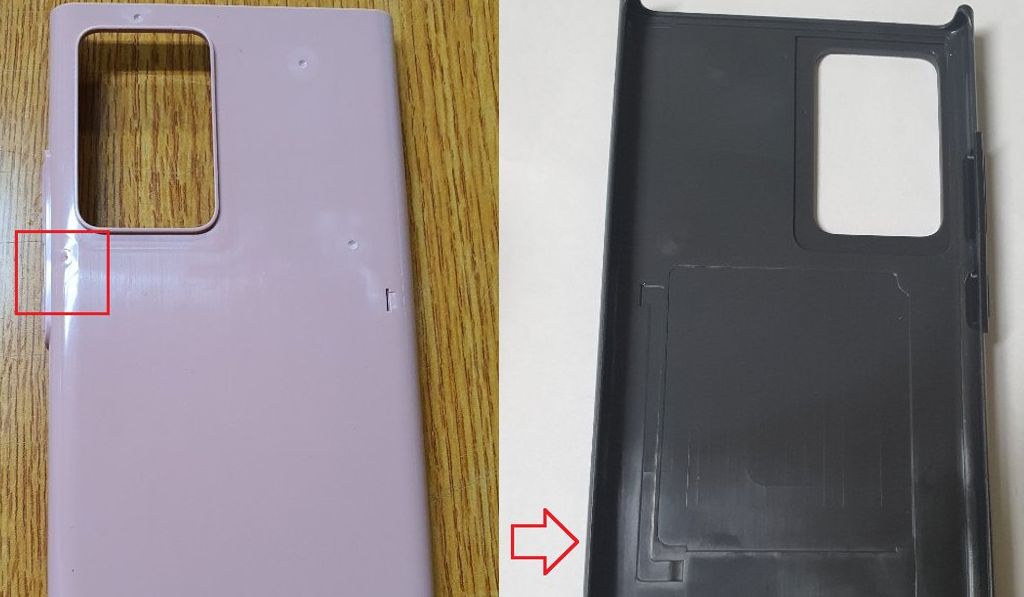
samsung galaxy note 20 plus cover leakRoland Quandt (Twitter)

Let the Samsung Galaxy Note 20 leaks begin! Months before the phone itself is likely to be released, a newly posted image reportedly hints at what the next phone in the Galaxy Note series might be like in terms of its overall design. The Galaxy Note 20 leak was posted by Winfuture.de editor Roland Quandt on his Twitter account (via SamMobile).

He claims the images in his post are of an inlay mold for the official Samsung LED View Cover.  The cover will be sold alongside the upcoming Note 20 Plus.

Two things about the collage of images stand out. One is the very large cutout in the back for what is presumably the Note 20 Plus’ rear camera setup. The other notable design cue is that the mold shows the Note 20 will have its hardware buttons on the right side, rather than on the left side, like the current Galaxy Note 10 phones.

Quandt notes that the aspect ratio in this cover mold “could be a little off, too.” Keep in mind that Samsung has yet to confirm any info on the Galaxy Note 20 lineup (or indeed the existence of the phone itself). It’s also possible that design changes could occur between now and the phone’s release.

This is a very, very early Galaxy Note 20 leak. As always with these kinds of leaks, take these images of its View Cover mold with a bigger grain of salt than usual. Meanwhile, the Galaxy Note 10 is still on sale, if you can’t wait until later this year for the Note 20 series.

More posts about Samsung


from Android Authority https://ift.tt/39vDUgz

OnePlus reveals several OnePlus 8 series specs: Expect a notable speed bump https://ift.tt/3dIfrYL

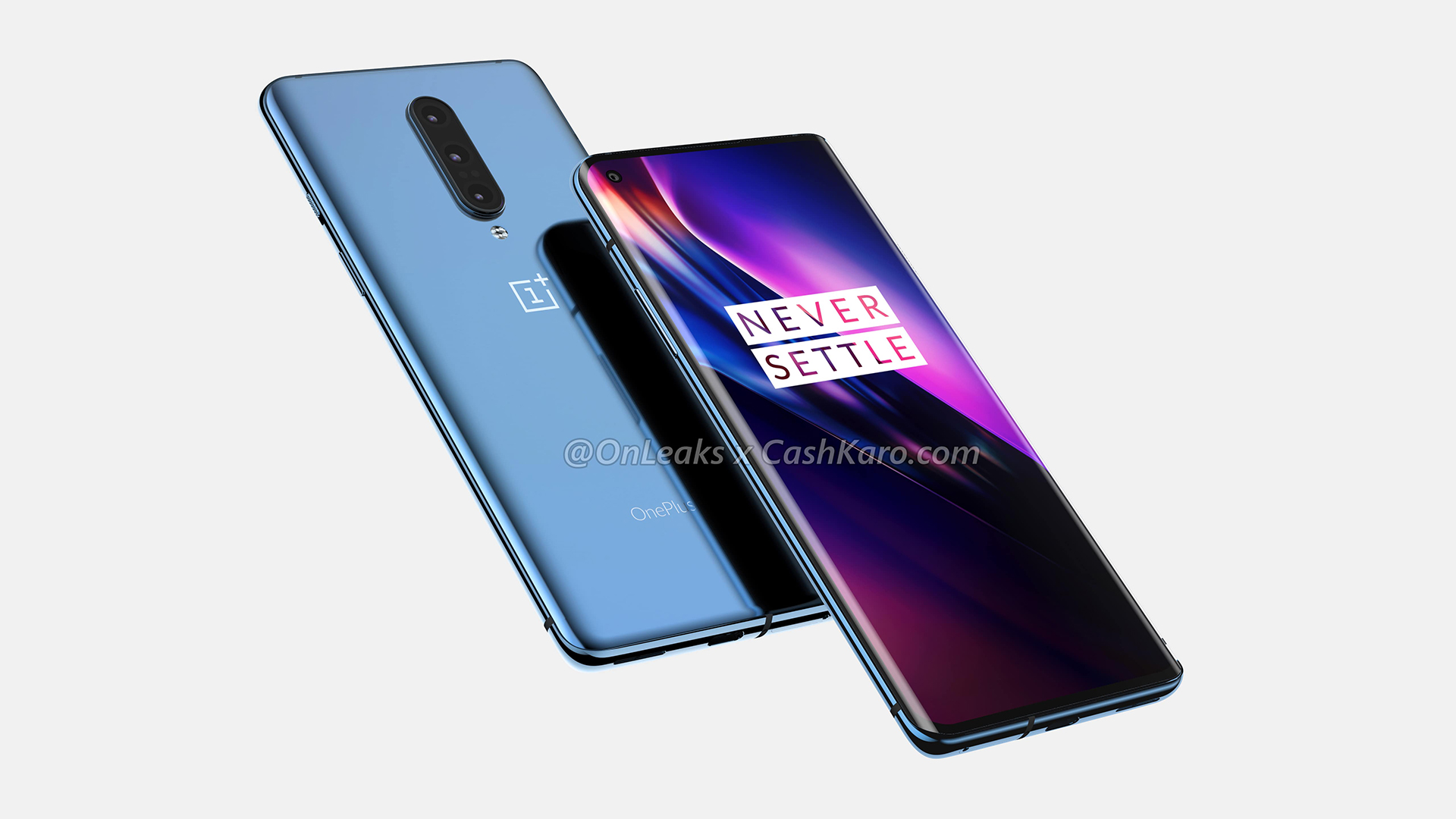
OnePlus 8 Leaked Render Side ViewCashKaro

We’ve seen plenty of OnePlus 8 series leaks and heard loads of rumors in the last few months, but OnePlus itself has now detailed a few important upcoming specs in a forum post.

More specifically, the company has confirmed that it’ll be using the latest LPDDR5 RAM standard, UFS 3.0 storage, and the Snapdragon 865 processor. The latter isn’t a surprise, as it’s Qualcomm’s top-end SoC for 2020. This of course means the phones will have a 5G modem too, as the modem is bundled with the processor. But the company previously confirmed that it was going “all-in” on 5G.

“Having announced our upcoming 120Hz Fluid Display back in January, today I want to focus on what sits beneath that stunning, true-to-life screen – our most powerful setup to date: the Snapdragon 865 SoC, coupled with LPDDR5 and UFS 3.0, for a dramatic increase in system performance, while reducing power consumption,” reads an excerpt of a post by OnePlus CEO Pete Lau.

UFS 3.0 storage isn’t new for the series, as the OnePlus 7T series had it, for one. But Lau also noted that they’ve added two new storage technologies in Turbo Write and Host Performance Booster.

“Turbo Write uses the upper section of the ROM’s storage as a high-speed read/write interval. Here, in theory, each read/write will enter this high-speed buffer, and then proceed to the next command of data transfer,” the executive explains. Meanwhile, the Host Performance Booster feature apparently improves random read performance “after extended use.”

The OnePlus CEO says they’ve also been pushing for more software optimizations, saying they’ve had a so-called FSE team (Fast, Smooth, Efficient) since 2016.

There’s no doubt that we can expect the company to reveal more OnePlus 8 series details in the lead up to the official launch. But for now, you can visit our OnePlus 8 rumor hub at the previous link.

More posts about OnePlus


from Android Authority https://ift.tt/2R1N26l

The 10 sexiest movies on Amazon Prime right now https://ift.tt/3awTASf

Amazon Prime Video Sexy Movies

If you are looking to make things hot and heavy for a movie date night or just hoping to get your mojo working, Amazon Prime has a number of sexy movies to tickle your fancy. This steamy selection of movies feature some of the biggest Hollywood celebrities and titles that have gone down in history as some of the sexiest ever. So if you’re done Netflixing and chilling, it’s time to set the mood with these 10 sexiest movies on Amazon Prime right now.

Don’t have an Amazon Prime membership? You can sign up for $12.99 a month, or $119 a year. There’s a 30-day free trial available for new members. Also, a cheaper option is available if you just want to access Amazon Prime Video without the shopping incentives. Head here to learn more about Amazon Prime or click on the button below to subscribe.

Sexiest movies on Amazon Prime:

Editor’s note: We’ll be updating this list of the sexiest movies on Amazon Prime regularly as new ones are released.


1. Newness

Martin and Gabriella are two millennials who are hooked to online dating apps. When they match with each other, they begin a steamy and whirlwind romance. Their open relationship pushes their physical and emotional boundaries and as they continue their string of hookups, and they soon realize they want more stability in life. The movie definitely has some sexy scenes but the underlying theme is that of the difficulties a couple faces in an open relationship. A good watch overall.


2. Spread

Spread is surely one of the sexiest movies on this list. The film stars Ashton Kutcher as a drop-dead-gorgeous gigolo who survives on the pity of women he sleeps with. Living in Los Angeles, Kutcher’s character mooches off of single, rich women in return for sex, sex, and more sex. Then one fine day, he meets the love of his life. Little does he know that he’s dealing with a female version of himself.


3. Adore

Friendship, love, and lust collide in this sensual tale set within a close-knit seaside community. Two lifelong best friends — Naomi Watts and Robin Wright — get entangled in sexual relationships with each other’s sons, an obvious recipe for disaster. What ensues is a conflict between emotion and desire. Which one will take precedence?


4. Discreet

Monique is a high-class escort who enjoys her job. She’s used to fulfilling her clients’ fantasies, until she meets Thomas. He’s a sheltered and religious man who wants to put his upbringing behind him by losing his virginity. The two are completely mismatched. The night they meet, Thomas’ innocent questions make Monique rethink her lifestyle and she breaks all the rules of her profession by letting him into her heart.


5. The Escort

An unemployed sex addict goes job hunting and ends up with nothing but a promise of a magazine job. To prove his worth, he takes up an assignment to shadow a prostitute and write-up a profile, but slowly, he starts to develop feelings for her. You can only imagine what happens when a person hooked to hook-ups meets another who gets paid for them.


6. The Neon Demon

This is an Amazon production which tells the story of an aspiring model named Jesse who moves to Los Angeles with dreams of making it big. She rises to fame quickly and many become jealous of her beauty and charm. Women around her are also curious about her sexual disposition and use it to their advantage. Things turn sinister when Jesse starts showing signs of narcissism and raging envy takes over all her model friends.


7. Knock Knock

Who wouldn’t want to see Keanu Reeves get seduced by not one, but two women. In this sexy thriller, the Matrix man plays a not-so-innocent middle-aged guy who is enjoying an evening at home alone when two young women come knocking on his door for help. Things get hot and heavy between the three and a deadly game of cat and mouse begins.


8. Stripped To Kill

Stripped To Kill is an erotic thriller from the 80s. The story follows a female detective who goes undercover as a stripper to investigate a series of murders that happen around a strip club. The movie has some pretty daring visuals for its time and captures the real essence of what goes on inside a strip joint.


9. Basic Instinct 2

Basic Instinct is by far one of the sexiest Hollywood movie series of all time. Sadly, Amazon Prime does not carry the first film in the series, but the second one is very much available for streaming. The plot continues the story of novelist Catherine Tramell who once again finds herself the subject of a murder investigation. This time too, she is suspected of killing her lover while giving him an orgasm. Tramell is ordered to go into therapy where she starts playing games of seduction with her doctor. Will her true intentions be exposed or will she get away with murder using sexual trickery one more time?


10. Passion

Another erotic thriller, Passion stars Rachel McAdams and Noomi Rapace as two advertising executives who work for the same company. One of them secretly starts dating the other’s boyfriend and soon professional rivalry tears them apart. So much so, that one of them ends up dead. Passion, as the name suggests, is full of passionate scenes between all the central characters. It’s also an edgy thriller that’ll keep you guessing right till the end.


So those were the 10 sexiest movies on Amazon Prime that we could find. Have any more suggestions? Drop us a line in the comments section below.

Remember, you’ll need to subscribe to Amazon Prime to watch all of the above-mentioned movies. If you haven’t subscribed to streaming service yet, you can do so by hitting the button below. After you become a Prime member, you can watch all of the aforementioned titles for free. 

Looking for more streaming shows and movies on Amazon Prime? Check out these links below.

Best comedies on Amazon Prime Video you can watch right now
The best Amazon Prime shows you can stream right now
The 15 best original series on Amazon Prime Video
The best classic movies on Amazon Prime right now

More posts about Amazon Prime


from Android Authority https://ift.tt/39rKtAM